
IPsec Site to Site VPN Different Scenarios Configuration

Summary Insights:
- In this post will cover IPsec Site to Site VPN configuration multiple scenarios on Cisco routers with practical project explanation, if you want to learn Basic & different Types of IPsec you can read here like what/why VPN IPsec
- This post will mainly focus on IPsec Site to stie VPN configuration part
- In last you can download all device running Configuration file
IPsec Scenario:
We will cover multiple scenarios in ipsec Site-to-Site VPN configuration on Cisco Devices below
- Point to Point also called Hub and spoke (Single Branch)
- Hub and spoke (Hub to multiple sites) also called star. Hub will handle centrally
- Full Mesh ,all sites can communicate directly without Hub
Lets start with one example if there is one HQ office & one site office in different location and site office want to access some services like server/printer/IP Phone PBX etc in HQ office required Site to site VPN.
Both offices install Cisco Router connect with ISP for internet like below
HQ & Site office in different geographical location
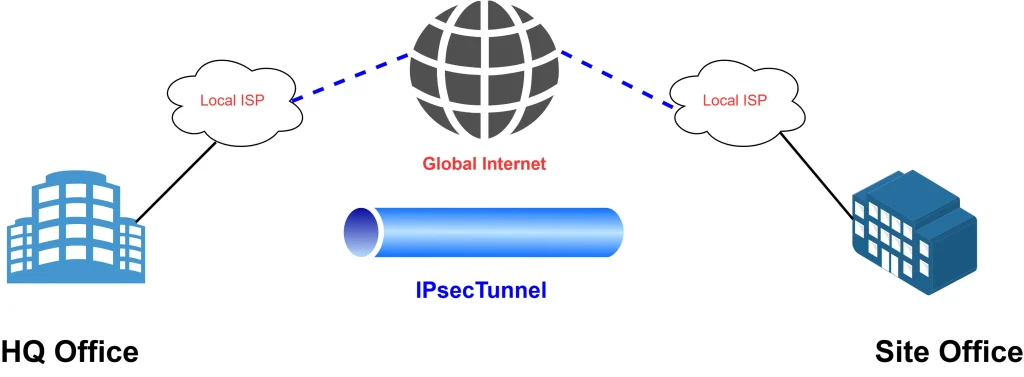
IPsec Site to Site on Cisco Router both side

IPSec is open standard framework used to establish tunnel by using multiple protocols to achieve confidentiality, integrity & authentication.
- IKE for negotiation process of VPN
- ESP for Actual Data
Tunnel negotiation IKE using ISAKMP protocol consists of two phases
Phase-1: also called main mode consists of six messages first four with clear text & last two encrypted.Bydefault Phase-1 lifetime is one day.
Phase-2:Also called quick mode ,Data tunnel creation used for actual data.Bydefault phase-2 lifetime is one hour.
IPSec Site to Site VPN Configurations (Single subnet):
if you have only single subnet on each site like in HQ (10.10.1.0) & site has (192.168.1.0). Lets start configuration for below EVE-NG topology

I will not show the interface configuration part as its very easy ,I will start from ipsec main important configuration part. LAN side private subnet configuration on loopback interface just to verify testing.
First configure HQ-Office for phase-1 configurations Remember shortcut word to memorize “HAGLE”
First create ISAKMP Policy then below
H: Hashing (SHA..)
A: Authentication Pre shared key PSK or Certificate base
G: Group (Diffie Helfman group)
L: Lifetime
E: Encryption (DES,3DES,AES-128,AES-256)
Phase-1 Configuration on HQ-Office:
Generate Key same on both side:
crypto isakmp key Readtech123 address 200.0.0.1
Phase-2 Configuration on HQ-Office:
In phase-2 below configuration steps required
During crypto map configuration there will be one notification like in below screenshot that add ACL & peer detail to enable crypto map

Crypto map:
Apply on outside public Internet Interface:
Default Static Route:
As our Edge router connected with ISP modem device ,configure default static route toward ISP device as below

Phase-1&2 all configurations should be same only crypto map name is locally significant, but encryption & hashing algorithm must be same on both side.
Above all Configuration on HQ-office has been finished.
Exactly same configuration on site-office only revers the peer ip address like change 200.0.0.1 to 100.0.0.1.
Configuration has finsihed on both side let me test ping from HQ-Office with source loopback0 to site-Office loopback ip 192.168.1.1

Verify IPsec Phase-1
Now let me verify IPsec phase-1 status by running “show crypto isakmp sa” command

state –> QM_IDLE representing phase-2 state QM stand for Quick mode, IDLE means tunnel is up & normal
Status –>ACTIVE means ipsec phase-1 is up & running
Conn-id –> is a unique connection ID its help during multiple tunnel session.
Verify IPsec Phase-2
Lets check & verify ipse phase-2 by running “show crypto ipsec sa peer ” command

in above screenshot there is mentioned cypto map name,peer ip & packet encapsulation & decapsulation quantity.
IPSec Site to Site VPN Configurations (Multiple subnet):
Above was for one LAN subnet communication now if you have new requirements of new subnet then how to add in existing site to site ipsec VPN.
Multiple Subnets Network in site to site VPN

Very easy just update ACL , for example new subnet on HQ office 10.10.2.1/24 then add in VPN-ACL on both side , HQ-Office & site-Office as below

Now there will be two Security association (SA) with two different subnet, below you can see with new subnet 10.10.2.0

Note: One physical interface can bind with one crypto MAP.
HUB and Spoke IPsec Site to Site VPN Configuration:
Now lets move to the new scenario HUB and multiple spoke, site to site ipsec configuration,if one site want to commuicate with another site it will carry through HUB site.

Here we have added new site-2-Office ,in above topology let me update Configuration
HQ-Office Configuration:
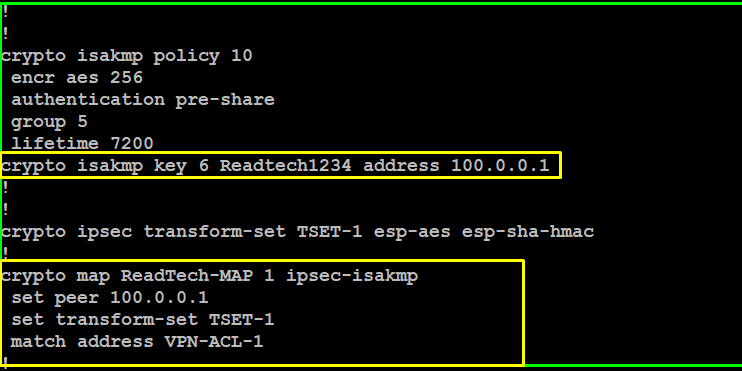
Configure isakmp key for new site as below

Configure New ACL & add new subnet for site-2-office
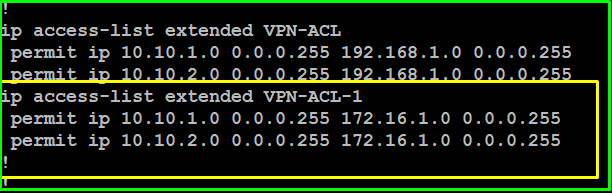
As you know one crypto map will bind with one physcial port , now we will configure crypto map with same name & different sequence number as mentioned in below screenshoot

Site-2-Office Configuration:
Below are the Crypto isakm policy & Crypto MAP configuration
Site-2-office ACL & Loopback & static route configuration

Verify Phase-1 of Hub & Spoke

Verify Phase-2 of Hub & Spoke
Check ipsec sa from site-2-office toward HQ-Office

Full Mesh site to site Communication
Now site-office cannot ping site-2-office , if you want to achieve communication b/w Branches site then update ACL on HQ & Both sites like add all subnets on HQ & site-office & Site-2-office ACL configuration.After ACL update if site-office want to communicate with site-2-office it will go first to HQ then will go to site-2-office.
Next i will continue other important scenario like, IPsec with dynamic ip, IPsec HA etc topics.
Download Configuration files
You can download below all three devices running configuration files.