
How to Stack (IRF) 2, 3 & 5 H3C Switches | Correct Topology & Cabling

Summary Insights:
- Stacking is also called IRF (Intelligent Resilient Framework) in H3C. It combines multiple physical devices & works as a single logical device. In this way, we will obtain more ports as per our requirements and also redundancy of equipment.
- In this post will cover two,three & five switches stacking/IRF configuration.
What is IRF/Stacking:
Stacking is also called IRF (Intelligent Resilient Framework) in H3C. It combines multiple physical devices & works as a single logical device. In this way, we will obtain more ports as per our requirements and also redundancy of equipment.
Stacking of two switches is very easy & straightforward, but when we are going to stack more than two, like stacking 3,4, or 5 switches, then we need the correct port connection in order to achieve proper stacking & redundancy.
Today I will focus on the practical part of two, three & five H3C switch stacking connectivity & configuration. Lets start
NOTE:
- Before starting Stack/IRF configuration, let me explain to you some important concepts that an engineer must remember. There are two types of ports: physical & stack logical and we can add multiple physical ports to one logical port.
IRF/Stack Logical Port:
in H3C IRF/Stack logical ports are below
Irf-port X/Y
X–> represents the member ID, like in stacking multiple switches 1,2,3, etc
Y–> Represents the logical IRF port
Now the IRF/Stack logical port must be connected in Cross 1–> with —> 2
1/1–>2/1 is wrong
1/1–>2/2 Correct
Let me explain again in one line: ” Physical port can connect in any order, but IRF logical port must be connected in a cross”
Why question is always in Engineer mind like why connect in Cross ?
Think like 1 is Tx & 2 is Rx , we cannot connect 1 → 1 or 2 → 2 means TX → TX or RX → RX , Tx should be with Rx, 1 → 2 ,
Clear now? If not, drop your question in the comments 👇
Two Switch Stacking:
Below are the connectivity & configurations required on SW-A & SW-B for IRF/Stacking.
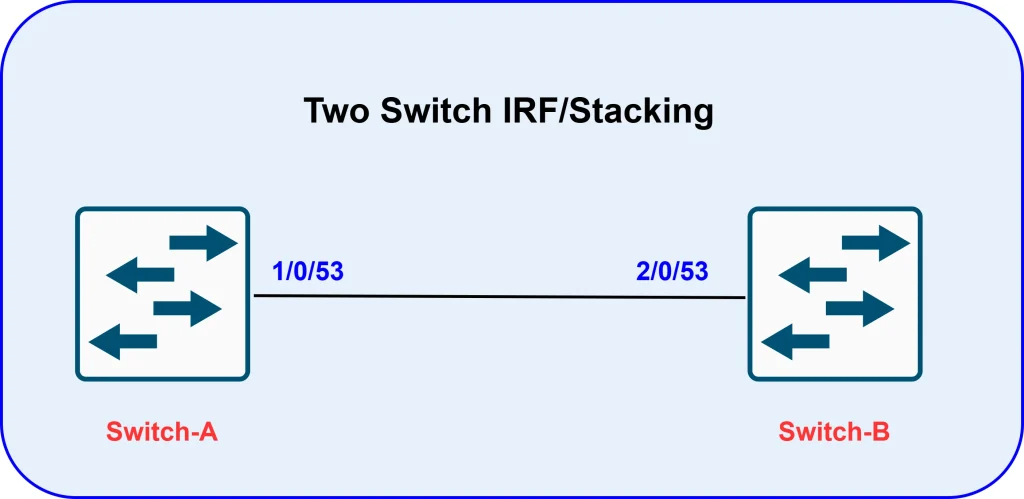
SW-A(1/0/53) ↔ SW-B(2/0/53)
✅ SW-A:
#Irf member 1 priority 30
irf-port 1/1
port group interface Ten-GigabitEthernet1/0/53
#
# irf-port-configuration active
✅ SW-B:
#Irf member 1 renumber 2
Reboot switch
#Irf member 2 priority 20
irf-port 2/2
port group interface Ten-GigabitEthernet2/0/53
#
#irf-port-configuration active
IMPORTANT:
- Keep the ports shutdown during IRF/stacking configuration & reboot after completion.
Watch switch stacking
Three Switch Stacking:
Below are the Connectivity diagram & configurations
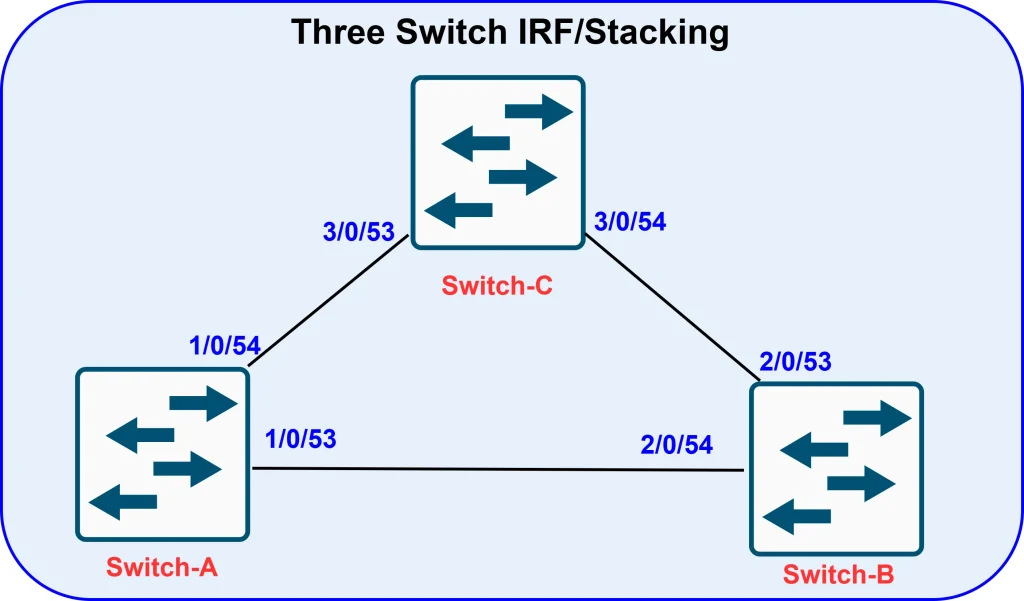
SW-A(1/0/53) ↔ SW-B(2/0/54)
SW-B(2/0/53) ↔ SW-C(3/0/54)
SW-C(3/0/53) ↔ SW-A(1/0/54)
✅ SW-A:
#Irf member 1 priority 30
irf-port 1/1
port group interface Ten-GigabitEthernet1/0/53
#
irf-port 1/2
port group interface Ten-GigabitEthernet1/0/54
#
#irf-port-configuration active
✅ SW-B:
#Irf member 1 renumber 2
Reboot switch
#Irf member 2 priority 20
irf-port 2/1
port group interface Ten-GigabitEthernet2/0/53
#
irf-port 2/2
port group interface Ten-GigabitEthernet2/0/54
#
#irf-port-configuration active
✅ SW-C:
#Irf member 1 renumber 3
Reboot switch
#Irf member 2 priority 10
irf-port 3/1
port group interface Ten-GigabitEthernet3/0/53
#
irf-port 3/2
port group interface Ten-GigabitEthernet3/0/54
#
#irf-port-configuration active
Five Switch Stacking:
Below is the diagram & you can download the configuration file by directly clicking on below file.
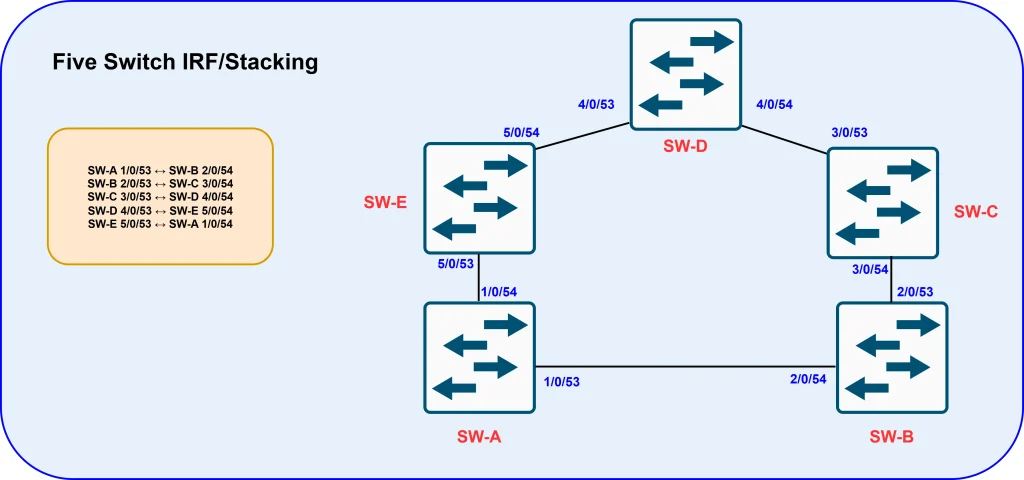
SW-A 1/0/53 ↔ SW-B 2/0/54
SW-B 2/0/53 ↔ SW-C 3/0/54
SW-C 3/0/53 ↔ SW-D 4/0/54
SW-D 4/0/53 ↔ SW-E 5/0/54
SW-E 5/0/53 ↔ SW-A 1/0/54